
Introduction
CSS stands for Cascading Style Sheets. It is used to style and design web pages created with HTML.
While HTML is used to structure content, CSS is used to control how that content looks on the screen. With CSS, you can change colors, fonts, layouts, spacing, and overall appearance of a website.
In this lesson, you will learn the basics of CSS and how it works with HTML.
What You’ll Learn
- What is CSS
- Why CSS is important
- How CSS works with HTML
- Basic CSS syntax
- Types of CSS
What is CSS?
CSS (Cascading Style Sheets) is a language used to describe the presentation of a webpage.
👉 It controls:
- Text color & size
- Background colors & images
- Margins & padding
- Borders
- Page layout
- Mobile responsiveness
- Animations
What Happens Without CSS?
Without CSS, web pages appear plain and unstyled. HTML only provides structure, not design.
Example Without CSS:
<h1>Welcome</h1>
<p>This is a simple webpage.</p>
👉 Output:
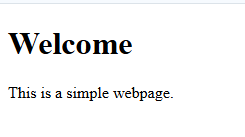
- Default font
- No colors
- No spacing control
- Basic layout
Example With CSS:
<style>
  h1 {
    color: blue;
  }  p {
    font-size: 18px;
    color: gray;
  }
</style>
<h1>Welcome</h1>
<p>This is a styled webpage.</p>
👉 Output:
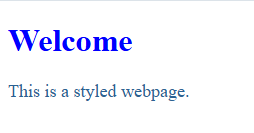
- Colored heading
- Styled text
- Better readability
CSS transforms a simple HTML page into a visually attractive and user-friendly website.
Why do we need CSS?
Without CSS, web pages look plain and unstyled.
👉 CSS helps you:
- Make websites visually attractive
- Improve user experience
- Create responsive designs
- Maintain consistency across pages
🔹 HTML vs CSS
| HTML | CSS |
|---|---|
| Structure | Styling |
| Content | Design |
| Skeleton | Appearance |
👉 Example:
- HTML → Creates heading
- CSS → Changes its color and size
How CSS works with HTML
CSS works by selecting HTML elements and applying styles to them.
👉 Example:
<p>This is a paragraph.</p>
p {
  color: blue;
}
👉 The paragraph text will appear in blue.
Basic CSS Syntax
CSS consists of selectors and declarations.
selector {
  property: value;
}
Example:
h1 {
  color: red;
  font-size: 24px;
}
Explanation:
h1→ Selectorcolor→ Propertyred→ Value
Complete Example
<!DOCTYPE html>
<html>
<head>
    <title>CSS Example</title>
    <style>
        body {
            background-color: lightgray;
        }        h1 {
            color: blue;
        }        p {
            font-size: 18px;
            color: black;
        }
    </style>
</head>
<body><h1>Welcome to CSS</h1>
<p>This is a styled paragraph.</p></body>
</html>
👉 This shows how CSS works in a real webpage.
Types of CSS
There are three ways to apply CSS:
1️⃣ Inline CSS – inside HTML tag
2️⃣ Internal CSS – inside <style> tag
3️⃣ External CSS – separate .css file (BEST way)
1️⃣ Inline CSS
Applied directly inside HTML elements.
<p style="color: blue;">Hello</p>
👉 Not recommended for large projects.
2️⃣ Internal CSS
Written inside <style> tag in <head> section.
<style>
  p {
    color: green;
  }
</style>
3️⃣ External CSS (Recommended)
Written in a separate .css file.
<link rel="stylesheet" href="style.css">
👉 Best for large websites.
CSS Comments
Comments are used to explain code.
/* This is a comment */
👉 They are ignored by the browser.
How CSS Cascading Works
CSS follows a priority system:
- Inline CSS → Highest priority
- Internal CSS → Medium
- External CSS → Lowest
👉 This is called the cascade.
Advantages of CSS
- Saves time (reuse styles)
- Easy to maintain
- Improves page design
- Supports responsive layouts
Real-Life Uses of CSS
- Designing websites
- Creating layouts
- Styling buttons and forms
- Making responsive designs
Important Notes
- Always use external CSS for large projects
- Keep CSS clean and organized
- Avoid too much inline CSS
- Use meaningful selectors
Common Mistakes
- Missing semicolons
- Wrong property names
- Using inline CSS excessively
- Not linking CSS file properly
Best Practices
- Use external CSS
- Write clean and readable code
- Group related styles
- Use comments when needed
Practice Tasks
- Task 1: Change the color of a paragraph using CSS.
- Task 2: Apply font size to a heading.
- Task 3: Create an internal CSS example.
- Task 4: Link an external CSS file.
- Task 5: Write a simple CSS rule for
<h1>.
FAQs
What is CSS?
CSS is used to style and design web pages.
Why is CSS important?
It improves the appearance and user experience of websites.
What are the types of CSS?
Inline, Internal, and External CSS.
Conclusion
CSS is an essential part of web development that helps transform simple HTML pages into visually appealing websites. By understanding CSS basics, syntax, and types, you can start designing your own web pages.
👉 In the next tutorial, you will learn about CSS Syntax & Selectors in detail.