
Introduction
Headings and paragraphs are among the most commonly used elements in HTML. They help structure the content and make web pages readable and well-organized.
Headings are used to define titles and sections of a webpage, while paragraphs are used to display blocks of text. By using headings and paragraphs properly, developers can organize information clearly and improve both readability and accessibility.
What You’ll Learn
- HTML heading tags (
h1toh6) - HTML paragraph tag (
p) - Proper usage of headings
- Difference between headings and paragraphs
HTML Headings
HTML provides six levels of headings, from
<h1>to<h6>.<h1>represents the most important heading on the page, while<h6>represents the least important heading.
<h1>Main Heading</h1>
<h2>Sub Heading</h2>
<h3>Section Heading</h3>
<h4>Smaller Heading</h4>
<h5>Very Small Heading</h5>
<h6>Smallest Heading</h6>
How the Output Looks in the Browser
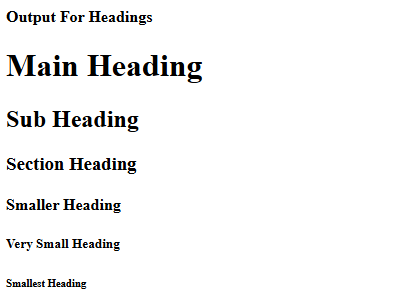
When you open the HTML file in a web browser, the headings appear in different sizes.
The <h1> heading appears the largest, while <h6> appears the smallest.
Explanation of Heading Levels
HTML provides six levels of headings, from <h1> to <h6>.
These headings represent a hierarchy of importance.
<h1>is usually used for the main title of the webpage.<h2>is used for major sections.<h3>to<h6>are used for smaller sub-sections.
Using headings in the correct order helps both users and search engines understand the structure of your content.
When to Use Headings
- Use
<h1>for the main page title - Use
<h2>for sections - Use
<h3>–<h6>for sub-sections - Do not use headings just to make text bold
HTML Paragraphs
Paragraphs are essential for presenting readable text on a webpage. When writing articles, tutorials, or blog posts, paragraphs help separate ideas into smaller sections that are easier to read.
Browsers automatically add spacing before and after each paragraph, making the text easier to scan.
Example:
<p>This is a paragraph in HTML.</p>
<p>Each paragraph starts on a new line.</p>
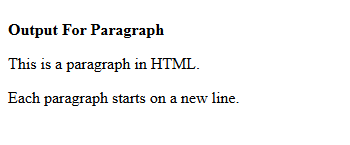
How the Output Looks in the Browser
Paragraph text appears as normal readable text below the headings.
How to Use Headings and Paragraphs Together
<h1>My Website</h1>

<h2>Introduction</h2>
<p>This is the introduction section of the webpage.</p>

<h2>About HTML</h2>
<p>HTML is the language used to create web pages.</p>
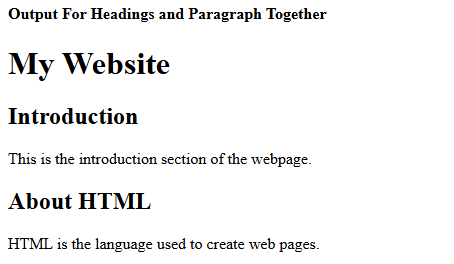
How the Output Looks in the Browser
Headings divide content into sections, while paragraphs provide detailed information within those sections.
In most web pages, headings and paragraphs are used together.
The heading introduces the topic, while the paragraph explains the details.
This structure helps readers quickly understand the main points of the content.
Line Break vs Paragraph
Remember simple rule:
🔹 Line break = formatting change (simply moves the text to the next line without starting a new paragraph)
🔹 Paragraph = idea change (group of sentences focused on one main idea)
Line Break Example:
<p>Hello<br>Welcome to Div PHP Tutorials</p>
Please note:
<br>breaks the line<p>creates a new paragraph with spacing
A line break <br> is useful when you want to move text to the next line without creating a new paragraph.
It is commonly used for:
- Addresses
- Poems
- Short lines of text
However, for normal text content, paragraphs should always be used instead of multiple line breaks.
Why Headings Are Important for SEO
Headings help search engines understand the structure of a webpage.
The <h1> tag usually represents the main topic of the page, while other headings divide the content into sections.
Using headings correctly can improve the readability of your content and make it easier for search engines to index your page.
Important Notes
- Browsers ignore extra spaces
- Use paragraphs for readable text
- Headings help SEO and accessibility
- Always use headings in order
Common Mistakes
- Using multiple
<h1>incorrectly - Skipping heading levels
- Using
<br>instead of<p>for text blocks
Practice Tasks
- Task 1: Create a page with one
<h1>heading and two paragraphs. - Task 2: Create a page using
<h1>,<h2>, and<h3>headings. - Task 3: Write a short article using headings and paragraphs.
- Task 4: Create a page with one
<h1>heading, two<h2>headings, and paragraphs under each heading.
FAQs
What is the difference between <h1> and <h6>?<h1> is the most important heading, while <h6> is the least important.
Can a webpage have multiple <h1> tags?
Yes, but usually a webpage should have only one main <h1> heading for better structure and SEO.
In the next tutorial, we’ll learn about HTML Text Formatting.