
Introduction
A landing page is one of the most important web pages used in marketing and product promotion. In this project, you will build a modern landing page with hero section, features, and call-to-action using HTML & CSS.
What you’ll Learn
- Creating a modern landing page layout
- Designing a hero section with CTA
- Building feature cards using Flexbox
- Creating a call-to-action section
- Improving spacing and layout design
- Understanding visual hierarchy
Final Result
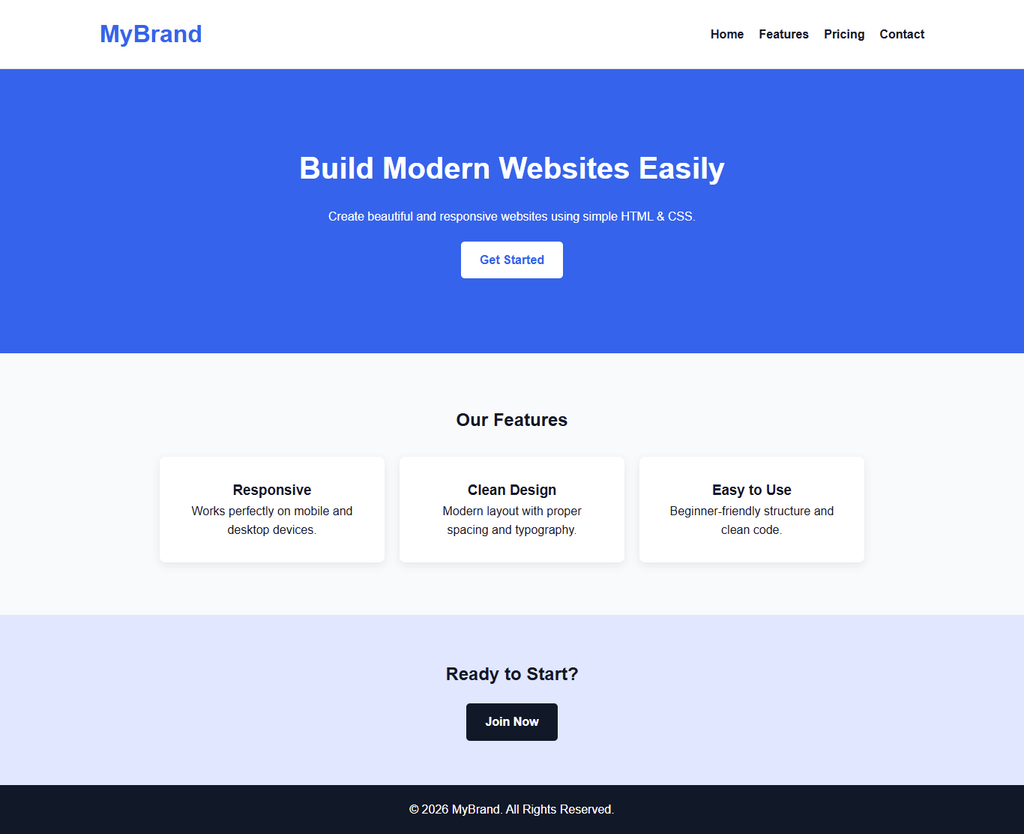
Step 1: HTML (index.html)
<!DOCTYPE html>
<html lang="en">
<head>
  <meta charset="UTF-8">
  <title>Modern Landing Page</title>
  <link rel="stylesheet" href="style.css">
</head>
<body>

  <!-- Header -->
  <header class="header">
    <div class="container">
      <h1 class="logo">MyBrand</h1>
      <nav>
        <ul class="nav-links">
          <li><a href="#">Home</a></li>
          <li><a href="#">Features</a></li>
          <li><a href="#">Pricing</a></li>
          <li><a href="#">Contact</a></li>
        </ul>
      </nav>
    </div>
  </header>

  <!-- Hero Section -->
  <section class="hero">
    <div class="container">
      <h2>Build Modern Websites Easily</h2>
      <p>Create beautiful and responsive websites using simple HTML & CSS.</p>
      <a href="#" class="btn">Get Started</a>
    </div>
  </section>

  <!-- Features Section -->
  <section class="features">
    <div class="container">
      <h2>Our Features</h2>
      <div class="feature-cards">
        <div class="card">
          <h3>Responsive</h3>
          <p>Works perfectly on mobile and desktop devices.</p>
        </div>
        <div class="card">
          <h3>Clean Design</h3>
          <p>Modern layout with proper spacing and typography.</p>
        </div>
        <div class="card">
          <h3>Easy to Use</h3>
          <p>Beginner-friendly structure and clean code.</p>
        </div>
      </div>
    </div>
  </section>

  <!-- CTA Section -->
  <section class="cta">
    <div class="container">
      <h2>Ready to Start?</h2>
      <a href="#" class="btn btn-dark">Join Now</a>
    </div>
  </section>

  <!-- Footer -->
  <footer class="footer">
    <p>© 2026 MyBrand. All Rights Reserved.</p>
  </footer>

</body>
</html>
Step 2: CSS (style.css)
/* ======================
   Variables
====================== */
:root {
  --primary-color: #2563eb;
  --dark-color: #111827;
  --light-color: #f9fafb;
  --gray-color: #6b7280;
}

/* ======================
   Global Styles
====================== */
* {
  margin: 0;
  padding: 0;
  box-sizing: border-box;
}

body {
  font-family: Arial, sans-serif;
  line-height: 1.6;
  background: var(--light-color);
  color: var(--dark-color);
}

.container {
  width: 90%;
  max-width: 1100px;
  margin: auto;
}

/* ======================
   Header
====================== */
.header {
  background: white;
  padding: 20px 0;
  border-bottom: 1px solid #ddd;
}

.header .container {
  display: flex;
  justify-content: space-between;
  align-items: center;
}

.logo {
  color: var(--primary-color);
}

.nav-links {
  list-style: none;
  display: flex;
  gap: 20px;
}

.nav-links a {
  text-decoration: none;
  color: var(--dark-color);
  font-weight: bold;
}

.nav-links a:hover {
  color: var(--primary-color);
}

/* ======================
   Hero Section
====================== */
.hero {
  text-align: center;
  padding: 100px 0;
  background: var(--primary-color);
  color: white;
}

.hero h2 {
  font-size: 40px;
  margin-bottom: 20px;
}

.btn {
  display: inline-block;
  margin-top: 20px;
  padding: 12px 25px;
  background: white;
  color: var(--primary-color);
  text-decoration: none;
  border-radius: 5px;
  font-weight: bold;
  transition: 0.3s;
}

.btn:hover {
  background: #e5e7eb;
}

.btn-dark {
  background: var(--dark-color);
  color: white;
}

.btn-dark:hover {
  background: #374151;
}

/* ======================
   Features Section
====================== */
.features {
  padding: 70px 0;
  text-align: center;
}

.feature-cards {
  display: flex;
  gap: 20px;
  margin-top: 30px;
  justify-content: center;
}

.card {
  background: white;
  padding: 30px;
  border-radius: 8px;
  width: 300px;
  box-shadow: 0 4px 12px rgba(0,0,0,0.08);
}

/* ======================
   CTA Section
====================== */
.cta {
  background: #e0e7ff;
  text-align: center;
  padding: 60px 0;
}

/* ======================
   Footer
====================== */
.footer {
  background: var(--dark-color);
  color: white;
  text-align: center;
  padding: 20px 0;
}
🧩 Step-by-Step Explanation
Step 1: Create the Header Section
The header contains the website logo and navigation menu.
- The
.containeris used to keep content aligned - Flexbox (
display: flex) is applied to position logo and menu side by side - Navigation links are styled using a horizontal list
👉 This creates a clean and professional top navigation bar.
Step 2: Build the Hero Section
The hero section is the first thing users see.
- It includes a heading, short description, and a call-to-action (CTA) button
- Center alignment is used for better focus
- Background color highlights this section
👉 This section is designed to grab attention and encourage user action.
Step 3: Create Features Section
The features section showcases key benefits.
- A heading introduces the section
- Multiple
.cardelements are used for each feature - Each card contains a title and description
👉 This helps present information in a structured and easy-to-read format.
Step 4: Use Flexbox for Card Layout
Flexbox is applied to .feature-cards:
display: flexaligns cards in a rowgapadds space between cardsjustify-content: centerkeeps them centered
👉 This creates a modern card-based layout.
Step 5: Design Call-to-Action (CTA) Section
The CTA section encourages users to take action.
- Includes a strong message and a button
- Uses a different background color for emphasis
- Button styling (
.btn-dark) creates contrast
👉 This improves user engagement and conversions.
Step 6: Style Buttons and Hover Effects
Buttons are styled using reusable classes:
.btnfor primary buttons.btn-darkfor variation- Hover effects improve interactivity
👉 This makes the UI feel more modern and dynamic.
Step 7: Apply Consistent Spacing and Layout
Spacing is handled using:
- Padding for sections
- Margin between elements
- Max-width container for alignment
👉 Proper spacing improves readability and design quality.
Step 8: Add Footer Section
The footer provides closing content.
- Simple centered text
- Dark background for contrast
👉 Gives a complete website structure.
💡 Real-World Use of Landing Pages
Landing pages are widely used in real-world web development for:
- Product promotions
- SaaS websites
- App downloads
- Marketing campaigns
A well-designed landing page helps convert visitors into users or customers.
👉 This is why learning landing page design is very important for developers and freelancers.
What You Can Modify in This Project
- Change colors to match your brand
- Replace text with real product content
- Add images or illustrations
- Improve button styles and hover effects
- Add pricing section or testimonials
- Make it fully responsive for all devices
⚡ Pro Tips for Better Landing Page Design
- Keep the design simple and clean
- Use clear call-to-action buttons
- Maintain proper spacing between sections
- Use readable fonts and colors
- Focus on user experience and clarity
🎯 What Students Learn Here
✔ Section-based layout
✔ Card layout using Flexbox
✔ CTA design
✔ Button variations
✔ Clean spacing
✔ Visual hierarchy
This project feels like a real SaaS landing page.
🔗 Related Posts
- 👉 Personal Portfolio Website Using HTML & CSS (Beginner Project)
- 👉 Blog Layout Using HTML & CSS (Step-by-Step Project)
- 👉 Simple Product Page Design Using HTML & CSS
- 👉 CSS Flexbox Complete Guide (Layout Made Easy)
- 👉 CSS Variables Explained (Reusable Styling Guide)
- 👉 Responsive Design in CSS (Media Queries Tutorial)